
Redefining the Product & Engineering Workflow in the AI Era
Part 1: Is Your Product & Engineering Team Being Rendered Obsolete by AI?
Let’s look at three common scenarios. See how many sound painfully familiar:
Scenario 1: You write a 30-page Product Requirements Document (PRD). The developers read the first two pages and completely ignore the rest.
Scenario 2: Employees spend an average of 11.3 hours a week in meetings—accounting for 28.3% of their entire workweek. Developers sit in these meetings silently calculating, “How many hours do I have left today to actually write code?”
Scenario 3: During every Sprint Planning meeting, when asked, “How many days will this feature take?”, the engineer pauses for three seconds before replying, “Probably… five days.” A number based entirely on gut feeling.
This isn’t just one company’s problem; it is a systemic plague across the entire tech industry.
Enter AI.
It has been over two decades since the Agile Manifesto reshaped software development. Today, Artificial Intelligence is acting as the catalyst for the “fourth wave” of software delivery. Over the past three years, AI has moved from the lab into every corner of the enterprise, profoundly altering how organizations plan, build, test, and release software.
For many, the immediate reaction is panic: Will AI replace my job?
That is the wrong question.
The real question you should be asking is: How far behind are you falling compared to teams that have already mastered AI?
Let the data speak for itself: Developers using AI tools see productivity gains of up to 88%. Overall, employees experience an average productivity boost of 40% after adopting AI—a surge driven by tool familiarity, proactive experimentation, and continuous learning.
This means that for a standard 10-person product and engineering team, the one utilizing AI can generate the actual output of 14 to 18 people operating without it.
AI isn’t here to replace product and engineering teams; it is here to replace teams that don’t know how to use AI.
Part 2: Where is AI Disrupting the Product & Engineering Workflow?
Before diving into the “how,” we must understand exactly “what” AI is disrupting. Let’s break it down into three dimensions.
2.1 The Impact on the “Product Side”
Requirements Analysis:
Previously, Product Managers (PMs) had to listen to user interview recordings word for word and summarize them manually. Now, by simply uploading audio or transcripts, AI can output a structured list of user pain points, high-frequency keywords, and sentiment analysis within 5 minutes.
Competitor Research:
A comprehensive competitor analysis report used to take a PM 3 to 5 days of collecting, reading, and organizing. Today, leveraging AI, an initial framework can be generated in just 2 to 3 hours, leaving the PM to focus purely on critical judgment and refinement.
Prototyping:
The speed at which AI generates low-fidelity prototypes (structural sketches used to quickly validate ideas) is nearing 10 times that of human effort. More importantly, the boundary between “prototype” and “product” is blurring—some AI-generated code can be executed right out of the box.
2.2 The Impact on the “Engineering Side”
AI-assisted programming is rapidly evolving from a “Copilot” (offering suggestions while humans make decisions) to a “Pilot” (AI taking the lead in execution).
Developers using tools like Copilot or Cursor can generate 3 to 5 times more lines of code per session.
But here is a crucial warning: 2024 data from GitClear reveals that the code “churn rate” (code that is written, rewritten, and rewritten again) has spiked from a baseline of 3.3% in 2021 to 5.7%-7.1% in 2024-2025. More code and faster speeds do not equate to more value or faster delivery.
This tells us one thing: AI can help you write more code, but if the requirements aren’t crystal clear and code reviews aren’t rigorous, you are essentially “manufacturing garbage at high speed.”
Another massive trend is the rise of AI Agents. Over a quarter of AI users are experimenting with “AI Agents”—systems capable of making autonomous decisions and coordinating workflows across various tools. Early adopters are already leveraging them for workflow execution, risk detection, governance, and even strategic planning.
2.3 The Impact on “Project Management / Scrum”
AI is quietly but tangibly integrating into Agile workflows. This manifests in several key areas:
- Backlog Refinement: Scrum Masters use it to prepare for retrospectives and spot recurring issues; Product Owners leverage it to clean up the backlog and analyze user feedback.
- Sprint Planning Estimation: AI analyzes historical data to help teams generate highly accurate workload predictions, replacing guesswork.
- Evolution of the Scrum Master Role: Shifting from a “meeting facilitator” to an “AI workflow governor.”
- The Core Shift of 2025: AI has become central to how software is conceptualized and delivered, pushing enterprises to link tech investments with quantifiable business outcomes and establish governance models that make data and decision-making transparent.
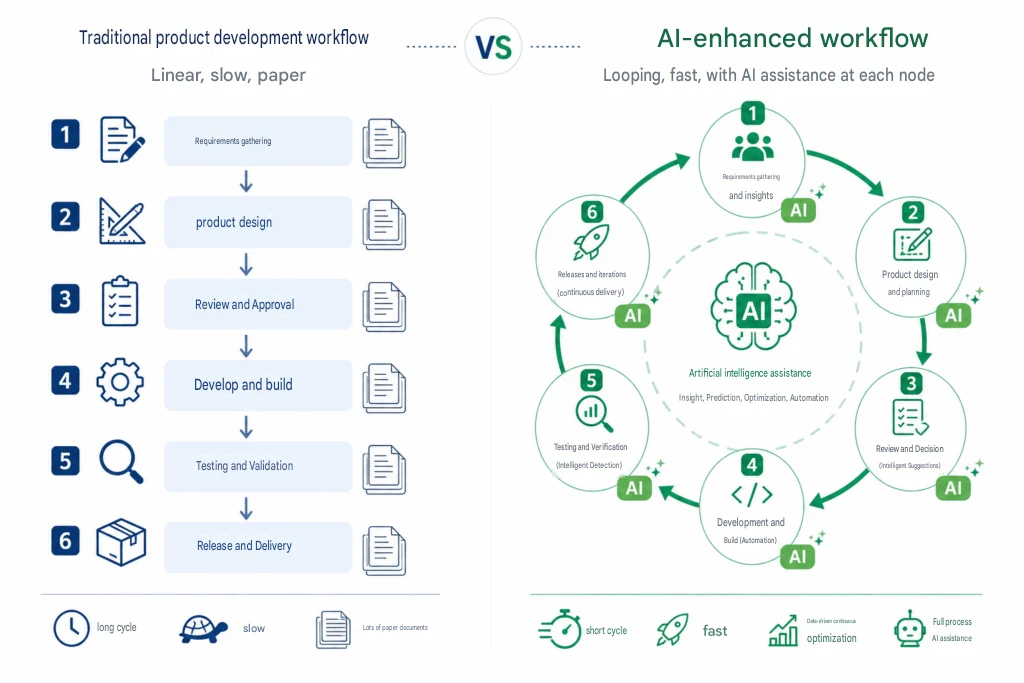
Part 3: Core Methodology: A Framework for Redefining Workflows in the AI Era
3.1 Core Principle: Define the “Human-AI Division of Labor” Before Optimizing Processes
The first mistake many teams make when adopting AI is treating it as an “omnipotent assistant that can do everything.” This leads to either over-reliance (where no one takes responsibility when things go wrong) or complete distrust (buying tools only to let them gather dust).
The correct starting point is: figure out exactly what humans should do and what AI should do.
Here is a highly practical framework—the “HAI (Human-AI) Division Matrix”:
| Task Type | Lead Role | Typical Examples |
|---|---|---|
| Creative judgment & Strategic decisions | Human | Product direction trade-offs, User value assessment |
| Repetitive & Structured tasks | AI | Document formatting, Test case generation, Meeting minutes |
| Data-driven analysis | AI Assisted + Human Decision | Requirement prioritization, Sprint velocity forecasting |
| Cross-departmental collaboration | Human Lead + AI Assisted | Progress syncing, Stakeholder alignment |
The core logic of this matrix is simple: AI excels at tasks that are pattern-based, highly contextualized, and repeatable; Humans excel at navigating ambiguity, exercising judgment, and applying emotional intelligence.
A highly effective litmus test is to ask yourself: “If I handed this task to a smart new hire who knows absolutely nothing about our company, could they do it?”
If yes, AI likely can too. If no, the task still requires deep human intervention.
3.2 Rebuilding the Product Workflow (The New AI-Powered PM Methodology)
Product management essentially boils down to three steps: Discovering the Problem → Defining the Problem → Designing the Solution. AI can be embedded in every phase, but the application methods vary.
Phase 1: Discovery
The Old Way: PMs listen to recordings, transcribe interviews, manually extract user needs, and write analysis reports. A single round of user research could take 2-3 days just for data processing.
The AI Way:
Step 1: Process raw user interview materials with AI.
Feed user interview audio (or transcripts) into an AI alongside this Prompt template:
You are a senior product researcher.
Below is the user interview transcript for [Product Name]. Please help me:
1. Extract the core pain points mentioned by the user (ranked by frequency).
2. Identify the user's true needs (differentiating between "surface needs" and "deep-seated needs").
3. Highlight 3-5 moments where the user displayed the strongest emotions during the interview, and explain why.
4. Summarize the user's core objective in a single sentence.

Interview Transcript:
[Paste transcript content here]
Step 2: Conduct competitor analysis with AI.
Please conduct a comparative analysis of [Competitor A], [Competitor B], and [Competitor C] regarding the [Feature Module]:
1. Core functionalities and unique differentiators for each.
2. Recurring complaints in user reviews (referencing App Store reviews, Reddit/Quora discussions).
3. Based on our product [Brief description], pinpoint the most valuable design approaches we can learn from.
4. List at least 3 unmet user needs or market opportunities that competitors have missed. Note:
Note:
AI-generated competitor analysis is limited by the recency of its training data and might miss newly launched features. PMs must always validate and supplement this with hands-on product testing.
Phase 2: Definition
The core deliverables here are: High-Quality User Stories and Clear Acceptance Criteria (AC).
User Story: A short description of a feature told from the perspective of the user. Standard format: “As a [user persona], I want to [perform an action], so that [achieve a goal].”
Acceptance Criteria: Specific conditions detailing “what constitutes done,” used to eliminate alignment gaps among product, engineering, and QA teams.
Prompt for AI-Assisted User Story Creation:
I have a product requirement. Please break it down into standard agile user stories.

Requirement Description: [Brief description]
Target User: [User persona]
Context: [Usage scenario]

For each user story, please provide:
- Standard Format: As a [persona], I want to [action], so that [goal]
- Priority Recommendation (High/Medium/Low) and rationale
- Acceptance Criteria (At least 3 criteria, using the format: Given [precondition] / When [trigger action] / Then [expected result])
- Potential risks or dependencies
A Practical Example: Suppose the requirement is “Users can share their workout logs to their social feeds from within the App.” The AI-generated output might look like this:
User Story: As a dedicated fitness user, I want to generate a shareable image of today’s workout log with one click and post it to my social feed, so that I can receive validation and encouragement from friends to maintain my fitness motivation.
Acceptance Criteria:
– Given the user has completed a workout log / When the user clicks the “Share” button / Then the system automatically generates an image containing workout data, date, and user avatar.
– Given the user has generated the shareable image / When the user clicks “Save to Album” / Then the image is saved at 1080×1080px resolution with a watermark logo in the bottom right corner.
– Given the user is not logged into WeChat / When the user clicks “Share to WeChat Moments” / Then the system prompts “Please authorize WeChat login first” and redirects to the authorization flow.
Integration with Scrum:
Before Backlog Refinement, the Product Owner (PO) can use AI to pre-process user stories, drastically improving meeting efficiency. When the team gathers, they no longer debate “what does this requirement mean?” but rather “what is the priority and technical approach for this requirement?”—saving at least 50% of meeting time, conservatively.
Phase 3: Design
The primary value of AI in the design phase is the rapid generation of testable low-fidelity prototypes to expose design flaws early.
A practical “AI Design Review” Prompt:
Acting as a [User Persona], please review the following product design concept:
[Paste design description or screenshot notes]

Please challenge this design from the following angles:
1. Where might a first-time user get lost or confused?
2. Does this design account for all edge cases (empty states, loading states, error states)?
3. If I am an impatient user, at which step am I most likely to drop off?
4. What extreme scenarios could completely break this user experience?
3.3 Rebuilding the Engineering Workflow (AI Collaboration Models for R&D)
The biggest misconception engineering teams have when adopting AI is treating it as an “upgraded search engine”—only asking it questions when stuck, without forming a systemic collaborative model.
Here is a “Five-Level AI Maturity Model” to help teams identify their current stage and chart their path forward:
| Level | Team Characteristics | Human’s Primary Role |
|---|---|---|
| L1 | Occasional AI searches/Q&A | Primary Developer |
| L2 | AI-assisted code completion (e.g., GitHub Copilot) | Primary Developer |
| L3 | AI possesses cross-file context awareness and handles module-level tasks | Code Reviewer + Architecture Decision Maker |
| L4 | AI Agents run autonomously for hours, handling complete features | Requirements Specifier + Auditor |
| L5 | AI fully and automatically generates production code from business goals | Product Strategy Maker |
Integration with Scrum — The DoD (Definition of Done) becomes hyper-critical:
DoD (Definition of Done): The agreed-upon checklist defining when a task is truly completed. Example: Code committed + Unit test coverage ≥ 80% + Code Reviewed + Documentation updated.
As AI accelerates code output, the gap between “it runs” and “it is truly done” is magnified. GitClear data shows code churn rising from a 3.3% baseline in 2021 to 5.7%-7.1% in 2024-2025. AI generates more code, faster, but if the DoD is ambiguous, technical debt will accumulate at an alarming rate.
Teams must reinforce a Test-First philosophy: Write test cases first (defining the “correct answer”), then let AI generate the code, and use the tests to validate the AI’s output. This prevents massive rework compared to the “write code first, add tests later” approach.
3.4 Rebuilding the 5 Scrum Events (Upgrading Agile Ceremonies with AI)
Scrum features five core events, often called “ceremonies.” Here is how AI seamlessly integrates into each one.
① Sprint Planning — Data-Backed Estimation
Traditional Pain Point: Workload estimation relies entirely on gut feeling. You spend two hours in a planning meeting, only to end up with, “Yeah, this looks about right.”
How AI Intervenes:
1. Pre-meeting, AI automatically analyzes historical data from the last 5-10 Sprints: team average Velocity, average completion time for various tasks, and common causes of delays.
2. It outputs a “Sprint Forecast Report,” recommending a safe workload capacity for the upcoming Sprint.
3. AI automatically breaks down large Epics into specific Tasks for the team to review and adjust.
Practical Prompt Reference:
Below is our team's Velocity data from the last 6 Sprints:
[Paste historical Sprint data]

We plan to include the following user stories in the upcoming Sprint:
[Paste story list and initial estimates]

Please help me:
1. Based on historical velocity, determine if this plan is overloaded (provide an overload risk probability).
2. Identify which stories might be under-estimated (referencing historical similarities).
3. Recommend an optimal delivery priority sequence for this Sprint.
② Daily Scrum — Compress Time, Focus on Blockers
Traditional Pain Point: A 15-minute stand-up morphs into a status reporting meeting. Ten minutes are wasted just listing “what I did yesterday,” leaving no time to discuss actual blockers.
How AI Intervenes:
1. AI automatically pulls actual progress from code commits (Git log) and ticketing systems (Jira/Linear) to generate automated status summaries for each member.
2. It flags tasks that haven’t been updated in over 24 hours as potential Blockers.
3. Before the stand-up, everyone receives an AI-generated “Daily Briefing,” allowing the actual meeting to focus purely on “clearing blockers.”
Result: Stand-up times are compressed from 15 minutes to 5-8 minutes, with far higher strategic value.
③ Backlog Refinement — AI Pre-processes, Humans Decide
Traditional Pain Point: The backlog acts like a hoarder’s garage—duplicate tickets, vague descriptions, and missing acceptance criteria. Refinement meetings turn into tedious “cleanup” sessions rather than strategic decision-making.
The backlog frequently becomes a “dumping ground.” AI can now help sanitize it, reducing clutter so the Product Owner can focus on strategy instead of administrative chores.
How AI Intervenes (Automated pre-meeting):
1. De-duplication: Identifies similar descriptions and flags potential duplicates.
2. Auto-completing AC: For tickets lacking Acceptance Criteria, AI drafts an initial version based on the description.
3. Pre-sorting Priorities: AI recommends priorities by aligning with business goals and historical completion rates.
4. Splitting Massive Tickets: Identifies stories that exceed a single Sprint’s capacity and suggests ways to slice them.
Entering the meeting with a “pre-processed Backlog” can boost efficiency by 50%-70%.
④ Sprint Review — AI-Generated Delivery Reports
Traditional Pain Point: Developers spend 20 minutes presenting technical implementation details. Stakeholders zone out. Valuable time for strategic feedback is completely lost.
How AI Intervenes:
1. Before the Sprint ends, AI aggregates: the completed stories, DoD compliance, and Planned vs. Actual delivery metrics.
2. It translates tech jargon into a “Value Delivery Statement” for non-technical audiences. Instead of saying, “We completed 8 API endpoints,” it says, “Users can now complete registration in 3 steps, reducing friction by 57%.”
3. POs and Stakeholders can then focus the Review on the ultimate question: Did this delivery meet the expected user value, and how should we pivot next?
⑤ Sprint Retrospective — Data-Driven Improvements, Not Guesswork
Traditional Pain Point: Retros easily devolve into venting sessions—”I feel like requirements changed too much,” or “Communication was off.” People vent, disperse, and nothing changes.
How AI Intervenes:
1. AI analyzes data across multiple Sprints to spot recurring bottleneck patterns (e.g., if testing is delayed for 3 consecutive Sprints, QA resources are likely a systemic bottleneck).
2. It generates an “Obstacle Heatmap”: Which issues occur most frequently? Which phase suffers the most delays?
3. It tracks the effectiveness of past action items: Were the improvements suggested in the last retro actually implemented?
Integration with Core Scrum Values:
The three pillars of Scrum are Transparency, Inspection, and Adaptation. AI’s greatest value in retrospectives is turning subjective “feelings” into objective “data”—making transparency clearer, inspections more accurate, and adaptations highly evidence-based.
Part 4: Implementation Guide: How to Roll Out an AI-Powered Workflow in Your Team?
Theory is easy. Now for the hard part: how to actually make it happen.
4.1 Navigate Three Pitfalls Before Execution
Pitfall 1: The “All-at-Once” Trap
Expectation: We are going to overhaul the entire workflow and inject AI into every phase simultaneously!
Reality: A month later, not a single phase is fully functional. Everyone reverts to their old habits, and AI tools become nothing more than buzzwords on a PowerPoint slide.
Correct Approach: Pick the sharpest pain point, run it for one Sprint, prove the value, then scale.
Pitfall 2: The “Tool Fragmentation” Trap
Expectation: Let’s buy this tool for PRDs, that tool for coding, and another one for QA. Buy them all!
Reality: It takes two weeks just to learn the tools. Context switching and copying/pasting between platforms ultimately murders productivity.
Correct Approach: Select 1-2 core tools, master them deeply, and expand based on actual, localized needs.
Pitfall 3: The “Total Delegation” Trap
Expectation: Just let the AI write the code, it’s smart enough.
Reality: Studies show that experienced developers using AI tools for programming tasks sometimes spend 19% more time than expected, despite subjectively feeling 20% faster.
Why? Ambiguous acceptance criteria → AI “understands” the wrong requirement → Veers off course → Massive rework.
Correct Approach: AI’s output quality is governed entirely by your input quality. The clearer the requirements, the better the AI performs. This is an inescapable reality.
4.2 The 4-Step Roadmap (Adopting Scrum’s Incremental Delivery Mindset)
Avoid big-bang transformations. Use Scrum’s incremental delivery mindset—take small, rapid steps so every Sprint yields visible improvements.
| Phase | Timeline | Action Path | Goal | Example |
|---|---|---|---|---|
| Sprint 1 | Weeks 1-2 | Target 1 pain point → Introduce 1 AI tool → Observe | Find a highly visible area for improvement to build team confidence. | Use AI to automatically draft initial Acceptance Criteria for the Backlog. |
| Sprint 2 | Weeks 3-4 | Consolidate learnings → Standardize Prompts → Train team | Turn ad-hoc AI usage into standard team protocol. | Establish a shared Prompt library (User Stories, Competitor Analysis, etc.). |
| Sprint 3-4 | Weeks 5-8 | Expand to adjacent phases to form a continuous workflow | Connect at least 3 AI-assisted workflow phases. | Discovery Analysis + User Story Generation + Automated Sprint Reporting. |
| Sprint 5+ | Week 9+ | Review ROI, outline the next AI upgrade roadmap | Quantify benefits to secure buy-in and plan next-stage investments. | Track metrics pre- and post-AI (delivery cycle time, meeting duration, defect rate). |
ROI Quantification Suggestion:
Capture baseline metrics before you begin—average story points completed per Sprint, average duration of refinement meetings, average defect count per release. After 8 weeks, compare the numbers. Let the data speak.
4.3 How Should Each Role Evolve?
| Role | Pre-AI Era: Primary Focus | AI Era: Core Value |
|---|---|---|
| Product Manager (PM) | Writing PRDs, wireframing, hosting requirement reviews. | Evaluating user value, QA’ing AI outputs, and strategic decision-making. |
| Software Engineer | Writing code line-by-line, reading docs, squashing bugs. | Defining exact specifications, auditing AI code, and architectural design. |
| QA Engineer | Manually executing test cases. | Designing test strategies, governing AI-driven automation testing frameworks. |
| Scrum Master | Facilitating ceremonies, removing blockers. | Optimizing human-AI workflows, establishing AI protocols. |
| Product Owner (PO) | Manually grooming and managing the Backlog. | Data-driven value decisions, steering strategic product direction. |
There is a universal pattern here worth noting: Every single role is migrating from “Executor” to “Evaluator.”
AI produces the raw materials; humans judge, select, and decide. This is not a demotion of human roles; it is an elevation—those who can exercise high-quality judgment will see their value exponentially magnified.
Part 5: Conclusion: Redefining Workflows is Fundamentally an Upgrade in Mindset
If you read the methodologies in this article and simply think, “That makes sense,” the value you gain is zero.
The tech race in the AI Era isn’t about “who buys the most AI tools”; it’s about “who fundamentally reinvents how they work.” Tools are merely the vessel; the mindset is the foundation.
Scrum has taught us for over two decades: Agile teams prioritize collaboration, adaptability, and rapid feedback. These exact values align conceptually perfectly with the generative and assistive nature of AI.
Transparency, Inspection, Adaptation—these three principles are not obsolete in the age of Human-AI collaboration. In fact, they are more crucial than ever before.
Transparency: Clearly define the human-AI division of labor, clearly establish AI’s operational boundaries, and meticulously articulate acceptance criteria.
Inspection: Never blindly trust AI outputs. Regularly review the real-world impact of AI integration using hard data.
Adaptation: No single workflow remains perfectly right forever. Continuously iterating based on real team feedback is the only correct path forward.